
Saddle fore/aft
The EZ Dashboard and the saddle fore/aft tab
Tap the saddle fore/aft tab on the EZ Dashboard. The video jumps to the 3 o'clock pedal position with the crank forward. The app shows your knee / pedal and effective saddle angle in a box beside the video with a chart underneath.
The chart plots both numbers at once. Knee / pedal runs across, and effective saddle angle runs up. It's mirrored to match your video: on a recording from the left side, like the demo, your knee further forward is to the left toward the front wheel. Above the green box means your hips are too far forward. Below it means they're too far back.
The green box needs both numbers in range. If either one is in the yellow, you're in the yellow. If either one is beyond it, you're in the red.
Six things to read on the saddle fore/aft tab. Tap one to see it on the screenshot:
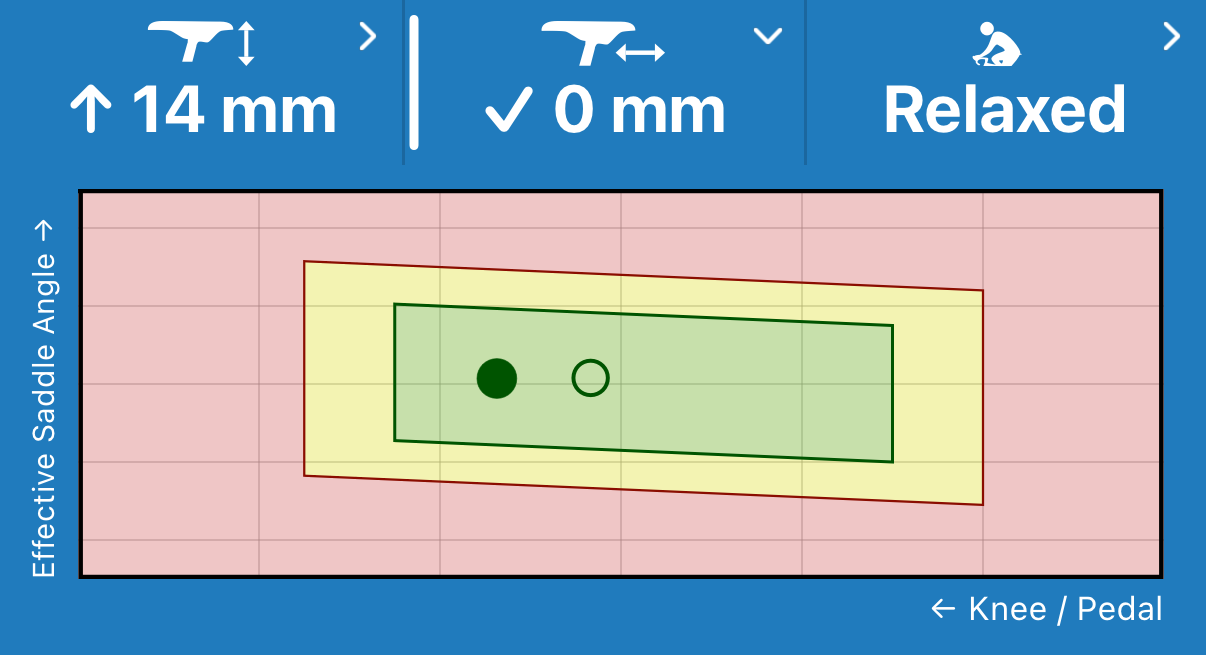
The fore/aft chart on the demo session.
- The ✓ or the arrow
- The filled dot
- The open circle
- Green (your window)
- Yellow
- Red
Next to the fore/aft tab sits the saddle height tab. It shows the other tab's suggestion: ↑ 14 mm on the demo session. The fore/aft reading assumes you've already made that height change.
You can be green and still see an arrow just as on the saddle height tab. The color says whether you're in your window. The arrow says which way to slide and how far to reach the app's target inside it.
In the green, don't chase the last few millimeters. Experienced bike fitters treat this window as a reference, not a target. Change your saddle when you're out of the green or when it doesn't feel right.
Your bike type moves the window. On an Aero/TT bike, the whole box moves forward: your knee sits ahead of the pedal and your hips further forward. Make sure your session has the right bike type.
After a change, record again. Your filled dot moves with your new position, so you can see where it landed.