
How to record well
Your crank arm is the ruler
To give you a recommendation of saddle movement in millimeters, the app needs one length it already knows: your crank arm. Enter your crank length, and the app uses it to work out how big everything else is.
To enter it, tap the top of the session page and set Crank Length in Bike Info. The app defaults to 172.5 mm. Your crank's length is usually printed on the inside face, near the pedal. If you can't find it, measure from the center of the bottom bracket to the center of the pedal axle.
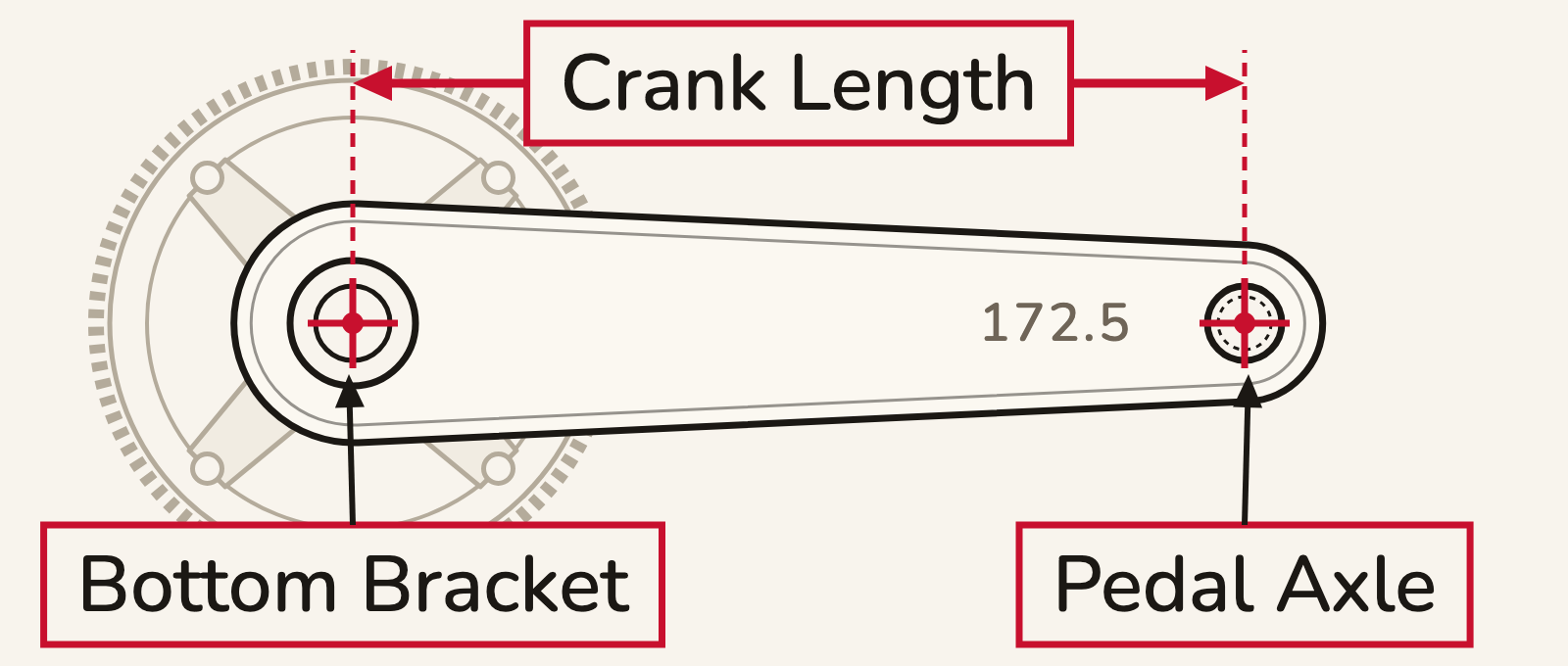
If you leave it at 172.5 mm on a different crank, your angles don't change at all, and the distances shift by only a few millimeters. So enter yours if you know it, but don't worry if you don't.
Changed it after recording? Recordings already in the session keep the old length until you re-analyze them: open the recording and tap ··· → Analysis → Reanalyze (on a side recording, Reanalyze (Quick) or Reanalyze (Precise)). Quick uses a lighter version of the tracking, so it's fast. Precise completes a full reanalysis of the video in its entirety, so it takes longer but is more accurate.